

Shipping & Handling

How To Activate Your eSIM

📲 eSIM Compatible Devices

Activating your Worldwide Travel eSIM is simple — just make sure you have an eSIM-compatible mobile device.

📩 After Purchase
You’ll receive your QR code via email and on the Order Confirmation Page — both in the King Sims app and website.

🛬 When You Land
🤳 Open your camera and point it at the QR code from your email, order page, King Sims app, or another screen
✅ Tap “Add eSIM” or “Add Mobile Plan”
🛜 Then head to your Mobile Data settings, turn “Data Roaming” ON
🚀 Start using your data instantly!

💡 Not sure if your device supports eSIM?
👇 Tap the button below to check 👇

Countries Covered

What countries your SIM works in

This global eSIM connects you in 190+ countries and territories around the world 🌐. Just insert your eSIM, turn “Data Roaming” ON, and your data will activate automatically based on your location.

Your 20GB plan is intelligently distributed into data zones, with priority data given in the most popular destinations.


🔥 Zone 1 – 20GB Data

Enjoy the full 20GB of blazing-fast 4G/5G data in these major regions:

  • 🇪🇺 Europe Zone: Includes the European Union, United Kingdom 🇬🇧, and Switzerland 🇨🇭

  • 🇺🇸 USA & 🇨🇦 Canada

  • Other Tier 1 Countries:
    Albania 🇦🇱, Algeria 🇩🇿, Saudi Arabia 🇸🇦, Argentina 🇦🇷, Armenia 🇦🇲, Australia 🇦🇺, Bangladesh 🇧🇩, Benin 🇧🇯, Belarus 🇧🇾, Bosnia & Herzegovina 🇧🇦, Botswana 🇧🇼, Brazil 🇧🇷, Burkina Faso 🇧🇫, Cambodia 🇰🇭, Cameroon 🇨🇲, Central African Republic 🇨🇫, Chile 🇨🇱, China 🇨🇳, Hong Kong 🇭🇰, Macao 🇲🇴, Colombia 🇨🇴, DR Congo 🇨🇩, South Africa 🇿🇦, South Korea 🇰🇷, Costa Rica 🇨🇷, Ivory Coast 🇨🇮, UAE 🇦🇪, Ecuador 🇪🇨, Gabon 🇬🇦, Georgia 🇬🇪, Guatemala 🇬🇹, Guinea-Bissau 🇬🇼, Guinea 🇬🇳, Honduras 🇭🇳, India 🇮🇳, Indonesia 🇮🇩, Japan 🇯🇵, Jordan 🇯🇴, Kosovo 🇽🇰, Laos 🇱🇦, North Macedonia 🇲🇰, Madagascar 🇲🇬, Malaysia 🇲🇾, Mali 🇲🇱, Morocco 🇲🇦, Mexico 🇲🇽, Moldova 🇲🇩, Montenegro 🇲🇪, Nicaragua 🇳🇮, Chatham Islands, New Zealand 🇳🇿, Uzbekistan 🇺🇿, Pakistan 🇵🇰, Peru 🇵🇪, Philippines 🇵🇭, Puerto Rico 🇵🇷, Russia 🇷🇺, El Salvador 🇸🇻, Senegal 🇸🇳, Serbia 🇷🇸, Singapore 🇸🇬, Taiwan 🇹🇼, Thailand 🇹🇭, Tunisia 🇹🇳, Turkey 🇹🇷, Northern Cyprus 🇨🇾, Ukraine 🇺🇦, Uruguay 🇺🇾, Vietnam 🇻🇳


Zone 2 – 15GB Data

You’ll receive 15GB of data in the following destinations:

Bahrain 🇧🇭, Egypt 🇪🇬, New Caledonia 🇳🇨, Kenya 🇰🇪, Kuwait 🇰🇼, Mauritius 🇲🇺, Nepal 🇳🇵, Oman 🇴🇲, Paraguay 🇵🇾, Qatar 🇶🇦, Dominican Republic 🇩🇴, Sri Lanka 🇱🇰


💧 Zone 3 – 10GB Data

Enjoy 10GB of data in these moderate-priority destinations:

Bolivia 🇧🇴, Republic of the Congo 🇨🇬, Ethiopia 🇪🇹, Ghana 🇬🇭, Jamaica 🇯🇲, Liberia 🇱🇷, Mozambique 🇲🇿, Niger 🇳🇪, Nigeria 🇳🇬, Uganda 🇺🇬, Rwanda 🇷🇼, Seychelles 🇸🇨, Sierra Leone 🇸🇱, Tanzania 🇹🇿, Chad 🇹🇩, Zambia 🇿🇲


🪫 Zone 4 – 5GB Data

You’ll receive 5GB in the following countries:

Azerbaijan 🇦🇿, Brunei 🇧🇳, Fiji 🇫🇯, French Polynesia 🇵🇫, Iraq 🇮🇶, Lebanon 🇱🇧, Lesotho 🇱🇸, Mauritania 🇲🇷, Mongolia 🇲🇳, Palestine 🇵🇸, Panama 🇵🇦, Papua New Guinea 🇵🇬, Tonga 🇹🇴, Vanuatu 🇻🇺


📉 Zone 5 – 1GB Data

Access 1GB of data in these destinations:

Afghanistan 🇦🇫, Antigua & Barbuda 🇦🇬, Aruba 🇦🇼, Bahamas 🇧🇸, Barbados 🇧🇧, Cape Verde 🇨🇻, Cuba 🇨🇺, Curaçao 🇨🇼, Bonaire 🇧🇶, Saba 🇧🇶, Sint Eustatius 🇧🇶, Sint Maarten 🇸🇽, Greenland 🇬🇱, Grenada 🇬🇩, Equatorial Guinea 🇬🇶, Guyana 🇬🇾, Kazakhstan 🇰🇿, Anguilla 🇦🇮, Montserrat 🇲🇸, Turks & Caicos 🇹🇨, British Virgin Islands 🇻🇬, Saint Kitts & Nevis 🇰🇳, Saint Lucia 🇱🇨, Saint Vincent & the Grenadines 🇻🇨, Suriname 🇸🇷, Togo 🇹🇬, Trinidad & Tobago 🇹🇹, Venezuela 🇻🇪, Yemen 🇾🇪


⚠️ Zone 6 – 50MB Data (Rest of World)

All other destinations outside of the above zones fall into Zone 6, where you’ll have 50MB of Data only — perfect for quick OTPs, ride bookings, or checking your location.

About Your SIM

📦 1 Hour Delivery: For security reasons, your order is manually verified before being fulfilled. Once approved, your eSIM QR code will be sent to your email and appear inside the King Sims App under “My eSIMs.”
📲 Scan & Activate with Ease
Activating your global eSIM is simple and works on all unlocked phones that support eSIM:

  1. 🛜 Connect to Wi-Fi (airport Wi-Fi works perfectly)

  2. 🤳 Open your phone camera and scan the QR code from your email, order page, or app

  3. ✅ Tap “Add eSIM” or “Add Mobile Plan”

  4. 📶 Head to your eSIM’s Mobile Data settings and turn “Data Roaming” ON
    🚀 You’re now connected and ready to travel the world!

📅 Validity – 31 Days: Your 31-day plan begins only once you activate your eSIM — not from the purchase date. You can buy now and activate later when your trip begins.
🔓 Unlocked Phones Only: Please ensure your phone is carrier-unlocked before attempting to install your eSIM. Locked devices will not be able to activate.
🌍 Works in 200+ Countries: From Paris to Patagonia, Tokyo to Toronto — this eSIM works in nearly every major travel destination worldwide.
(👉 Tap the “Countries Covered 🌍” tab for the full zone breakdown.)
📌 Data Allocation: 20GB of data is automatically allocated based on your destination.
📞 Includes Global Calls + SMS

  • 📞 15 minutes of international voice calls: Contact any mobile or landline number worldwide.

  • 💬 50 SMS to any number worldwide: Use your eSIM’s French mobile number to stay connected, verify bookings, or receive messages abroad.

  • 📇 French Mobile Number: Receive calls and texts directly while you’re abroad. Ideal for bookings, verifications, or staying reachable without data.

📶 Tethering & Hotspot Enabled: You can share your eSIM data with laptops, tablets, or travel companions via mobile hotspot.
🧠 Not Sure If Your Device Supports eSIM? Tap the tab titled  “eSIM devices” to check if your device is eSIM-compatible.
👑 Can Be Topped Up: This eSIM can be recharged with more 4G data or extra days once activated. Direct links to instantly recharge will be emailed.

SIM Features

🛜 20GB of Fast 4G/5G Data: Enjoy high-speed mobile data across 200+ countries and destinations around the world 🌍.

🗓️ 31 Day Plan: Valid for 31 days from activation — perfect for globe-trotters, backpackers, business travellers, and multi-country trips.

📞 International Calls: Call any mobile or landline number in the world with 15 minutes of international call time included.

💬 50 Global SMS: Send SMS to any mobile number worldwide, using your eSIM and it’s built-in mobile number.

Tier 1 Mobile Network: Coverage is by provided by Orange Mobile, the leading international mobile network.

📱 French Mobile Number Included: Comes with a French mobile number for receiving calls, verifications, and OTPs while abroad.

📶 Hotspot Enabled: Use your mobile data to tether or hotspot other devices like laptops and tablets.

🛬 Works in 200+ Countries: One eSIM profile gives you access to nearly every country around the world, ready to go upon arrival.

📤 1 Hour QR Code Delivery: We verify each order before for security before we send out the eSIM. Once approved, you’ll receive your QR code eSIM via email and available within the King Sims app under “My eSIMs”.

YOUR SECRET 🤫
KING SIMS APP CODE 🎁

king-sims-experience

Copy your secret 20% off King Sims app code down below. Apply it in your cart or checkout

QR Code
Activation Guide

Step-1-iPhone-QR-code-2x

Open your 'Cellular' or 'Mobile Data' settings.

Tap 👆 "Add eSIM"

QR Code
Activation Guide

Step-2-iPhone-QR-Code-Activation-Guide

You'll be directed to a screen with multiple activation options.
For QR code activation, select the option: "Use QR code"

QR Code
Activation Guide

Step-3-iPhone-QR-Code-Activation-Guide

Position your phone's camera on the QR code we emailed you and found in the King Sims App.

💡King Tip: Travelling with a friend? Simply send your QR code to a friend and scan it off their phone!

QR Code
Activation Guide

Step-4-iPhone-QR-Code-Activation-Guide

Wait a moment for the eSIM to detect the local network.

Once successful, you'll get a message saying:
"Your new eSIM is ready to activate"

👆Tap Continue

QR Code
Activation Guide

Step-5-iPhone-QR-Code-Activation-Guide

Data Only eSIMs:
If your eSIM comes only with data
👆Tap "Data Only"

eSIMs with Calls & Texts:
If your eSIM comes with calls & texts like our other eSIM ranges
👆Tap "Voice and Data"

QR Code
Activation Guide

Step-6-iPhone-QR-Code-Activation-Guide

Wait a moment ⏳
Once you see this notice pop-up, it means your activation has successfully completed.

Last Step:
Once you see this notification, we need to name and finalise your eSIM setup.
👆Tap "Done" When your ready.

QR Code
Activation Guide

Step-7-iPhone-QR-Code-Activation-Guide

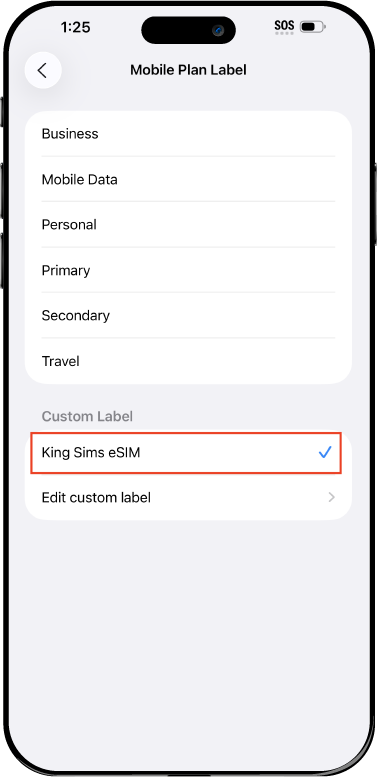
Name Your eSIM ✍️
Once you pass the last step, look for your newly activated eSIM and tap its "Name".

Mobile Plan Label:
Select "Custom Label"
Name it: "King Sims eSIM"

QR Code
Activation Guide

Step-8-iPhone-QR-Code-Activation-Guide

Final Step 👑
Turn on your line ✅

Turn Data Roaming to 'ON'
look for the option titled "Data Roaming"
then Tap 👆the option to turn it 'ON'

For Local eSIM plans with a mobile number, this step is not necessary.

You're Ready To Go 🎉

Step-9-iPhone-QR-Code-Activation-Guide

Welcome to the Kingdom 👑
Once you see the 4G or 5G symbol, test your mobile data.

Once your mobile data starts working without Wi-Fi it means your eSIM has successfully activated

Now you can start travelling with freedom
like a King 🤴 or 👸Queen.

✅ Step 1: Activate Your SIM Card

king-sims-experience.
📅 Add Your Arrival Date:
At checkout, let us know when you're landing in your destination — whether it's 🇺🇸 USA, 🇨🇦 Canada, or 🇲🇽 Mexico. We’ll schedule your SIM for seamless activation.
👑 Have King Sims Ready:
Make sure you have your King Sims packaging ready. It has all you need to get set up.
📲 Swap Your SIM cards:
Once you land, just pop the King Sims card into your phone. Use the "King Pin" in your packaging to swap your SIMs.
🔁 Restart Your Phone:
Give your device a quick restart to kickstart the activation magic.
📩 Get the Welcome Message: Depending on our partnered mobile network and which SIM card you ordered. You’ll get a welcome SMS from the Network with your brand new mobile number — you're officially connected! 🎉
💬 Need Help?
If you see SOS only or no signal, reach out via Live Chat — our support team can sort it in under 5 minutes. 👑
💡 King Tip:
If your King SIM works across multiple countries, don’t forget to turn Data Roaming ON to stay connected in every destination it covers. 🌍📶

Does My Device Have eSIM?

👑 King Tip: If your device isn't listed here simply search google with your phone model to find out if it is 💡

  • iPhone XS
  • iPhone XS Max
  • iPhone 11
  • iPhone 11 Pro
  • iPhone 11 Pro Max
  • iPhone SE (2020)
  • iPhone 12 Mini
  • iPhone 12
  • iPhone 12 Pro
  • iPhone 12 Pro Max
  • iPhone 13 mini
  • iPhone 13
  • iPhone 13 Pro
  • iPhone 13 Pro Max
  • iPhone SE (2022)
  • iPhone 14
  • iPhone 14 Plus
  • iPhone 14 Pro
  • iPhone 14 Pro Max
  • iPhone 15
  • iPhone 15 Plus
  • iPhone 15 Pro
  • iPhone 15 Pro Max
  • iPhone 16 (All Models)
  • iPad Pro (2018 and onwards)
  • iPad Air
  • iPad
  • Watch series 3
  • Watch series 4
  • Watch series 5
  • Watch series 6
  • Watch SE
  • Galaxy Z Flip
  • Galaxy Z Flip 5G
  • Galaxy Z Flip3 5G
  • Galaxy Z Flip4
  • Galaxy Z Flip5
  • Galaxy Fold
  • Galaxy Z Fold2 5G
  • Galaxy Z Fold3 5G
  • Galaxy Z Fold4
  • Galaxy Z Fold5 5G
  • Galaxy S20
  • Galaxy S21
  • Galaxy S21+ 5G
  • Galaxy S21 Ultra 5G
  • Galaxy S22
  • Galaxy S22+
  • Galaxy S22 Ultra
  • Galaxy Note 20 Ultra 5G
  • Galaxy Note 20
  • Galaxy S23
  • Galaxy S23+
  • Galaxy S23 Ultra
  • Galaxy S24
  • Galaxy S24+
  • Galaxy S24 Ultra
  • Galaxy S20 Ultra 5G
  • Gemini PDA
  • Pixel 3
  • Pixel 3a
  • Pixel 4
  • Pixel 4a
  • Pixel 5
  • Pixel 6
  • Pixel 6a
  • Pixel 6 Pro
  • Pixel 7
  • Pixel 7 Pro
  • Pixel 8
  • Pixel 8 Pro
  • P40
  • P40 Pro (not including the P40 Pro +)
  • Mate 40 Pro
  • Razr 2019
  • Razr 5G
  • Motorola Razr 40
  • Motorola Razr 40 Ultra
  • Razr+
  • Edge+
  • Edge 40
  • Edge 40 Pro
  • Edge 40 Neo
  • G52J 5G
  • G52J 5G Ⅱ
  • G53J 5G
  • Find X3 Pro
  • Reno 5 A
  • Find X5
  • Find X5 Pro
  • Reno6 Pro 5G
  • A55s 5G
  • Rakuten Mini
  • Big-S
  • Big
  • Hand
  • Hand 5G
  • Xperia 10 III Lite
  • Xperia 10 IV
  • Xperia 10V
  • Xperia Xperia 1 IV
  • Xperia 5 IV
  • Xperia 1 V
  • Xperia Ace III
  • Xperia 5 V
  • Honor
  • Magic 4 Pro
  • AQUOS Sense6s
  • AQUOS wish
  • AQUOS sense4 lite
  • AQUOS sense 7
  • AQUOS sense 7plus
  • AQUOS wish 2 SHG08
  • AQUOS wish3
  • AQUOS zero 6
  • Simple Sumaho6
  • AQUOS R7
  • AQUOS R8
  • AQUOS R8 Pro
  • V30
  • 12T Pro
  • 13
  • 13 Lite
  • 13 Pro
  • 13T Pro 
  • Honor Magic 4 Pro
  • Honor Magic 5 Pro
  • Honor 90
  • Honor X8
  • Oneplus Open
  • Oneplus 11
  • Oneplus 12 
  • Nokia XR21
  • Nokia X30
  • Nokia G60 5G
  • HAMMER Blade 3
  • HAMMER Explorer PRO
  • HAMMER Blade 5G
  • Vivo X90 Pro
  • Vivo V29 Lite 5G (Europe Only)

Worldwide Travel eSIM | 20GB Data | 200 + Countries | King Sims

USD $56.96

Availability: 134 in stock

- +

eSIM Features

About Your eSIM

Where Does it Work

How To Activate eSIM

Check eSIM Devices

Guaranteed Safe Checkout

How To Activate
Your eSIM

IN 3 EASY STEPS
how-to-use-eSIM-icon-1-king-sims

1. Check If Your Phone Works

Before you buy your eSIM. Make sure your device supports eSIM technology. Tap below to see our complete list of compatible eSIM devices.

how-to-use-eSIM-icon-2-king-sims

2. Buy Your eSIM

When you decide on the eSIM plan you want. Complete your purchase. Once purchased, you'll receive 2 emails, an order confirmation email and a seperate email containing a QR code with simple activation instructions.

how-to-use-eSIM-icon-3-king-sims-final

3. Scan & Activate

When you land in any Airport overseas. Connect to the free Airport Wi-Fi. Once connected, scan the QR code in your eSIM email, turn on data roaming and start using your eSIM right away!

Give Your Roaming Bill
The Royal Flush

Welcome To The King Sims Experience

Step 1: It All Starts With The King's Travel eSIM

Convenience is King 👑

Say goodbye 👋 to airport SIM cards and roaming rip-offs The King now connects you to the world in seconds. With one tap and a QR scan, you’re online in 180+ countries, powered by Orange, the world’s most reliable & trusted network. Travel like royalty 👑 with Worldwide data, international calls, and total peace of mind. No more guesswork. No more waiting. Just world-class coverage, wherever you land.
Step 2: *Ding* You’ve got an email! It looks like it’s from the King 👑

Don't Keep The King Waiting…

Open it up… Do you like what you see? It may not be as exciting as our physical King SIMs, but this neat little QR code has HUGE benefits. Save it and don’t forget to open your email or King Sims app with this QR code when you land overseas. Trust us, you’ll need it.
Step 3: Land OverseasScan & Play 🤳 Be On Your Way!

"TOUCH DOWN!" 🛬

When the plane lands, connect to the free airport Wi-Fi. Open your email with your King Sims eSIM and scan the QR code. Go to your "Mobile Data Roaming" settings and turn your "data roaming" to 'ON' Before you even leave the Airport, your eSIM should be up and running, and your phone buzzing 📲 from all the missed notifications on your flight ✈️ 

Step 4: Walk out of the Airport Like a King & Queen

You've Earned Your Crown, Now Wear It! 👑

🌍 Congratulations, my Global Royal Traveller! You’ve just unlocked 20GB of fast 4G/5G data in over 200 countries — with one powerful eSIM! No physical SIMs. No roaming bill nightmares. No lines at the airport. But this isn’t just smart travel — it’s elite travel.

Your eSIM comes with:

📞 15 minutes of international calls to any number on Earth
💬 50 global SMS for confirmations, OTPs, or staying in touch
🇫🇷 A real French mobile number for bookings, messages, and being reachable on the go

✅ And if you run out of data? Top up more 4G anytime directly with King Sims or Orange Mobile

Having data + calls in every country you visit?
You didn’t just skip the SIM line… You skipped limitations altogether.

Welcome to the King Sims Experience 👑

 

Royal Reviews

Connected 100K + Travellers 🎉
Customer Reviews
5.0 Based on 70 Reviews
5 ★
97% 
68
4 ★
3% 
2
3 ★
0% 
0
2 ★
0% 
0
1 ★
0% 
0
Write a Review Ask a Question

Thank you for submitting a review!

Your input is very much appreciated. Share it with your friends so they can enjoy it too!

Filter Reviews:
CD
18 May 2026
Chloe D.
AU AU

Singapore to Colombia easy setup ❤️

Installed the eSIM the night before my flight. Worked instantly in Singapore and later in Medellín. Super straightforward.

BH
18 May 2026
Brooke H.
AU AU

Two weeks in Peru and Argentina using the Worldwide eSIM

I started in Lima and later travelled to Buenos Aires. I installed the eSIM at the airport using WiFi before leaving Australia. It connected immediately when I landed in Peru and then again in Argentina without me doing anything extra. Most of my data use was maps, messaging apps and some light streaming at night. The 20GB felt comfortable for that amount of travel. I liked not having to search for local SIM cards.

KS
18 May 2026
Kelly S.
AU AU

Delay in activation

Activated it in Bali. It took about 10 minutes to pick up the airport Wi-Fi and activate. It stayed stuck on the word "activating" then it worked

RH
18 May 2026
Reece H.
AU AU

Vietnam and Cambodia worked perfectly 👌

Used the eSIM in Ho Chi Minh City and then Phnom Penh. Activation was quick and I had signal as soon as I landed in both.

0